
AI Generated Social Posts
This article outlines the steps to post 3-day coming soon listings to Facebook and Instagram using the FirstList platform.
1. Go to Settings
Go to Settings.
2. Connect Social Accounts
- Find the Connect Your Social Account section.
- Click on the connection options for Facebook and Instagram.
- Link your accounts to enable social media post generation.
3. Select a Coming Soon Listing
- Go to My Listings and select a listing that is marked as Coming Soon.
4. Generate Social Posts
- Look for the AI-Generated Social Posts section.
- Click Generate Social Posts to create draft posts for Facebook and Instagram.
- To edit images, click the Edit Image button.
- You can modify the posting directly in the preview.
- To regenerate a new social post, click Regenerate and provide instructions (e.g., highlight a new feature).
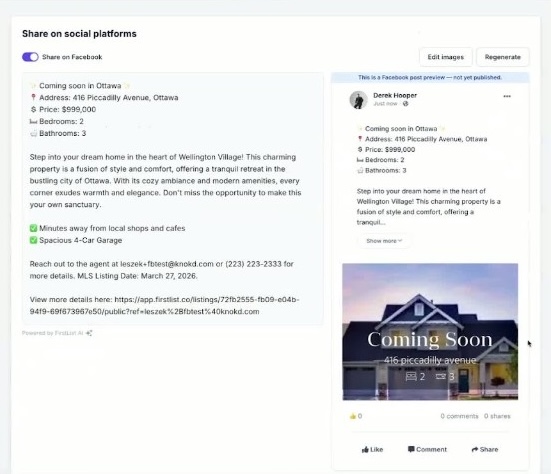
The Share on social platforms screen—edit your copy, use Edit images or Regenerate, and review the Facebook preview before you post.
5. Post to Social Media
- Once satisfied with the post, click Post to launch the listings on Facebook and Instagram.